Breaking

Monday, 31 August 2026

August 31, 2026

Simulating UAVs In Unreal Engine
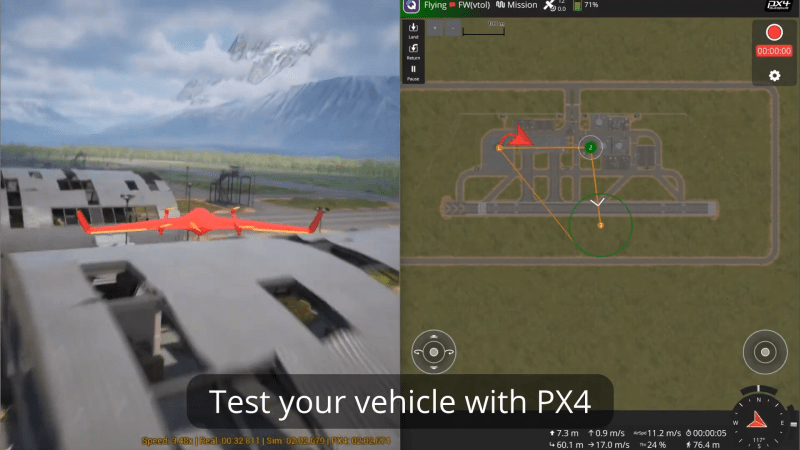
When it comes to building real-world flying vehicles, testing can be arduous and expensive. You have to find somewhere to fly, then you have to contend with environmental conditions and the possibility of damaging your craft if things go wrong. Simulation is a great solution to this, allowing testing without so much risk. To that end, [AlexanderRex] whipped up a platform for testing UAVs from the comfort of your computer desk.

PteroSim is intended as a comprehensive test bench for simulating autonomous aerial vehicles. It can run PX4, ArduPilot, and Betaflight binaries right in the simulator. The autopilot code is given simulated sensor data, and in turn responds with actuator commands, just as it would in a real craft. The simulator runs the flight dynamics using JSBSim, and the resulting scene is rendered in Unreal Engine 5.

If you’ve ever wanted to quickly road test different autopilot settings without heading out to the field or risking hardware, this is a great way to do so. It’s hard to beat the speed of iteration that is possible when testing on the computer on your desk. We’ve featured similar work before, too.


Sunday, 30 August 2026

August 30, 2026

Making a Robot to Serve Some Mean Badminton Shuttlecocks

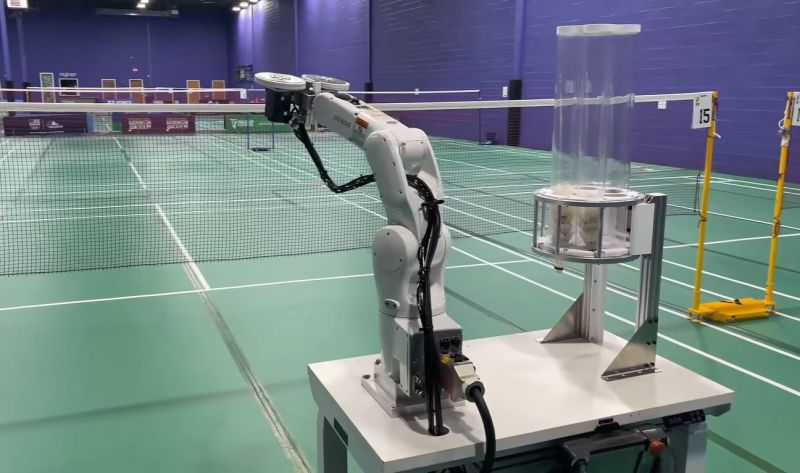
Sometimes regarded as a less violent form of tennis, badminton is still a pretty challenging sport. One which suffers like so many sports from requiring at least two players since magically flying balls and shuttlecocks haven’t been invented yet. After years of tinkering on a shuttlecock serving robot, [Travis Mitchell] hit upon the idea to convert a small industrial robotic arm for the purpose.

The target of this conversion is a positively cute-sized Denso VS050 robotic arm, with Denso helpfully providing a 3D model of the arm as a solid jumping-off point in a CAD project. Here the task of the robotic arm is two-fold: one is to grab a fresh shuttlecock from a hopper with a pneumatic grabber, the other is to feed it into the spinning wheels that grip and launch it. Fortunately [Travis] has a pretty tricked-out workshop available, including the ability to 3D print metal parts, making building the prototype a snap.

After initially thinking of using a Raspberry Pi Pico, he ended up using an ATmega AVR due to the input-output requirements when communicating with the arm. Using a height-adjustable desk as the base, the whole assembly was put together for some testing on the badminton court.

With most of the testing having been done in the shop already, the remaining issue was to determine the best disc material, as the two high-speed discs that grip the shuttlecock must be well-balanced and not stretch too much. Ultimately a 3D printed plastic disc with a silicone strip as gripping surface was found to work pretty well, allowing for the robot to finally start serving its function.


August 30, 2026

Get Your Monitor Transmitting VHF with a Browser Tool

If you’re intending to transmit on the VHF band, you’re probably going to reach for a handheld or some kind of rackmount rig in your ham shack. But you needn’t bother with all that complexity, when you can use the computer on your desk to spit out such signals using a simple browser tool from [Efe].

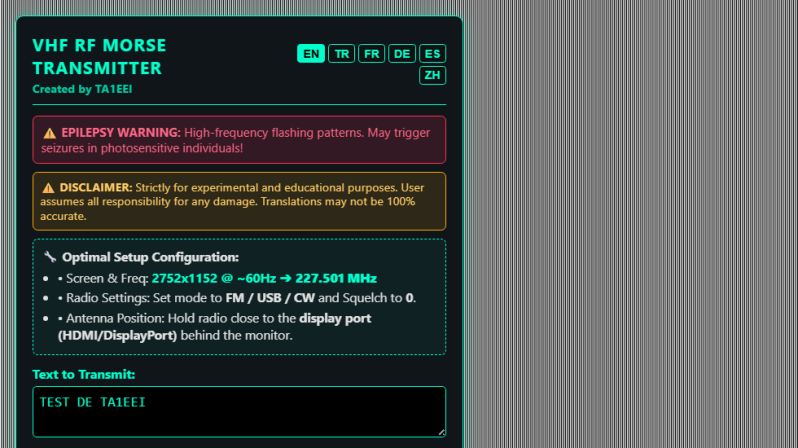
The concept is straightforward—[Efe]’s tool manipulates pixel clocks in order to create spurious transmissions from your computer’s graphics hardware. The math pencils out pretty easily—multiply the horizontal resolution by the vertical resolution by the refresh rate, while paying attention to the precise timing of the video standard your monitor is using, and you’ve got your transmission frequency. For example, for a screen displaying 1080p at 60 Hz, with the CEA-861 timing standard, your horizontal and vertical resolutions are 2200 and 1125 respectively when paying attention to the requisite blanking intervals. Multiply those by 60 hz, and you’ll find you’re creating a signal at 148.500 MHz. Leverage this by displaying the right pattern of black and white pixels to maximise changes in voltage state on the HDMI or DisplayPort lines, and you might create a strong enough signal that you can actually pick something up. [Efe] created a tool to display these patterns to send simple Morse code messages over VHF just by flickering your screen just right.

You can test the transmitter tool for yourself here, right in your browser. You’ll want to hold your radio’s antenna nice and close to the monitor to see if you can pick up much of a signal. After all, the monitor, connectors, and cable are all built to optimize for clear signal transmission to the display, while preventing signal from leaking out to interfere with surrounding equipment.

Of course, a fair warning—you’re not supposed to intentionally transmit on bands you’re not licensed for, even if it’s incredibly weak and unlikely for anyone else to notice in a scenario like this. Still, it’s an interesting project that shows you just how electromagnetic interference can leak out of just about anything under the right conditions.


August 30, 2026

Hackaday Links: August 30, 2026

Hackaday Links Column Banner

The big news today is, of course, the successful launch and deployment of NASA’s Nancy Grace Roman Space Telescope earlier this morning. The space agency’s latest observatory lifted off at 7:26 AM Eastern from Launch Complex 39A at Kennedy Space Center aboard a SpaceX Falcon Heavy, and by 8:00 AM it was separated from the rocket’s upper stage and flying on its own.

While the sound and fury of launch is exciting, it’s just the beginning of the journey for Roman. It will take several months for the spacecraft to complete its roughly 1.5 million-kilometer trek out to Earth’s second Lagrange point (L2), where it will set up shop near — in cosmic terms, anyway — the James Webb Space Telescope (JWST). Along the way, it will switch on and test various systems and components, with its primary 300 megapixel infrared camera scheduled to power up in three weeks or so.

There’s a lot to cover about the Roman Space Telescope. Built from spy satellite spare parts donated by the National Reconnaissance Office and featuring a field of view 100 times greater than that of Hubble, its launch is widely considered to be one of the most important scientific milestones of the decade. We’ll be bringing you more about the past, present, and future of this flagship mission as it progresses.

From real space missions to virtual ones, this week the developers of EVE Online announced that 2.4 million lines of code that keep the massively multiplayer online role-playing game running would finally be making the switch to Python 3. Given the immense complexity of the codebase, it’s been stuck at Python 2.7 since their last overhaul back in 2010, a situation which has become increasingly difficult to manage as time goes on.

The announcement goes into a surprising amount of depth about the state of Python in EVE. We imagine most players couldn’t care less, but naturally the developers have strong feelings about the situation and perhaps thought it would benefit others in a similar situation to get their thoughts out there.

While there’s certainly an argument to be made that the only justification they really need for making the migration is that 2.7 hit end-of-life back in 2020, the developers explain that the more immediate problem for them was that various tools and libraries they wanted to use were no longer compatible with the Python 2.x series. They also point out hopes that speed improvements made in the latest version of Python will eventually translate into better game performance down the road.

In more terrestrial news, this week the necessary regulatory amendments were passed to make plug-in solar systems legal in the United Kingdom. Assuming their wiring meets the necessary requirements consumers can pick up the hardware and install it themselves without having to involve an electrician, although they may still need to contend with landlords and local ordinances which may limit their ability to physically mount the panels. The rules as they stand now allow each residence to have four panels with a total combined output rating of no more than 2,000 watts, although critically, the system is only allowed to generate a maximum of 800 watts at the inverter. As the government and consumers get more comfortable with plug-in solar systems, it’s likely these numbers will be increased over time.

Solar isn’t the only area where DIY approaches are being applied to the mainstream. This week Citrix pitched a “different approach to endpoint resiliency”, an isolated Linux-based operating system called UniconOS which users can boot into should the computer’s primary Windows installation become compromised or otherwise inoperable. The idea is that having an independent read-only backup OS that’s kept on its own partition will reduce downtime since the computer can still be used while IT figures out what the hell happened.

This solution will sound suspiciously familiar to anyone who’s booted a live Linux system from CD/DVD/USB in the last few decades. Try not to keep yourself up all night wondering why you never pitched the idea to some hungry venture capitalists in exchange for a yacht in the Bahamas.

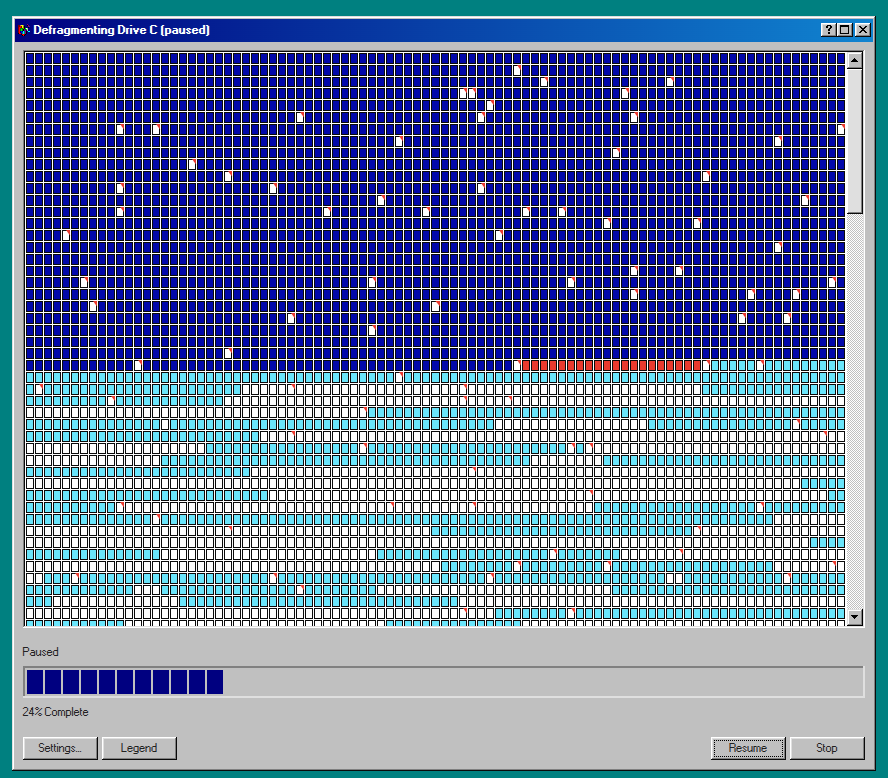
Finally, on the theme of new technology embracing the old ways, we bring you Defrag98, a web reincarnation of Microsoft’s dial-up era Disk Defragmenter tool. While it won’t actually improve the performance of your modern solid-state drive, you may find your own mood boosted by the wave of nostalgia when you see — and hear — the classic tool go to work.

That’s right, not only do the blocks dutifully flip from red to blue just like you remember, but all the while you’ll be treated to the unmistakable whirs and clicks of a spinning hard drive circa the turn of the millennium. Never forget what they took from us.


See something interesting that you think would be a good fit for our weekly Links column? Drop us a line; we’d love to hear about it.


August 30, 2026

Dissecting a Lethal Universal Travel Adapter

The world’s refusal to standardize on a single type of mains power outlet has led to a vibrant market of so-called travel adapters, all of which try to outdo each other in convenience and universality. This comes at the cost of complexity, something which ultimately reflects in the price. The cheapo $9.26 universal travel adapter that [Brainiac 75] got off an online retailer’s site is thereby a good example of how safety suffers if the overarching goal is to ‘make it cheap’.

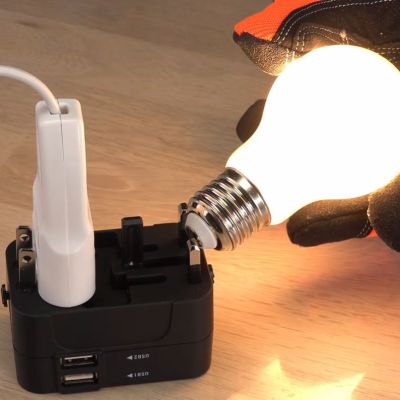
The first exciting discovery is that when you plug any of its three sets of connectors into an outlet, the others become live at the same voltage. This would suggest that they’re just wired together, a fact soon confirmed with a quick resistance check between the respective prongs. Though to the adapter’s credit, the prongs are not live when fully retracted into the enclosure. Yet as demonstrated in the video, the retracting of prongs is not enforced, so mistakes here are possible.

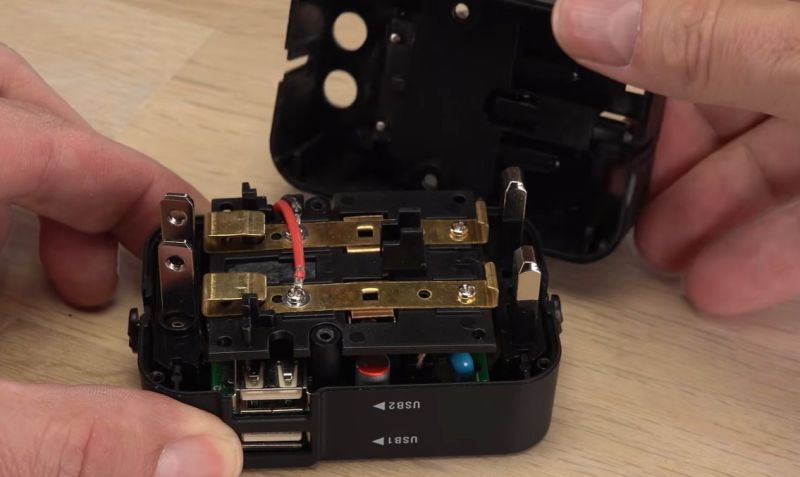
The adapter also has two USB ports that claim to provide 5 V at 2.1 A, with as it turns out no hard cut-off. This is probably the best part of the adapter despite not featuring any advanced charging features. After opening the adapter, you can see that the sliding mains prongs connect to a central bus bar when either unfolded or extended, which is definitely straightforward, but doesn’t enforce that only one type of prongs can be used at any given time.

To make it safer, [Brainiac75] removed the less useful US and UK plugs, taping over the empty holes. It’s now just a USB charger with a universal mains port to plug random non-EU plugs into, which is probably relatively safe and a better idea than really using it as a travel adapter.


Saturday, 29 August 2026

August 29, 2026

Laser Your Way to Smoother FDM 3D Prints

Now, not everyone minds the characteristic layer lines you get with Filament Deposition Modeling (FDM) 3D prints, but sometimes you need a smooth surface. If so we might go for filling primer, Bondo, or maybe break out the ABS and vapor smooth. Well, [I changed a thing] has an alternate suggestion: lasers. Laser melting can smooth the walls on a print, or the top surfaces as he shows in two different videos, both embedded below. The results look roughly similar to vapor smoothing, without the chemical exposure small risk of explosion.

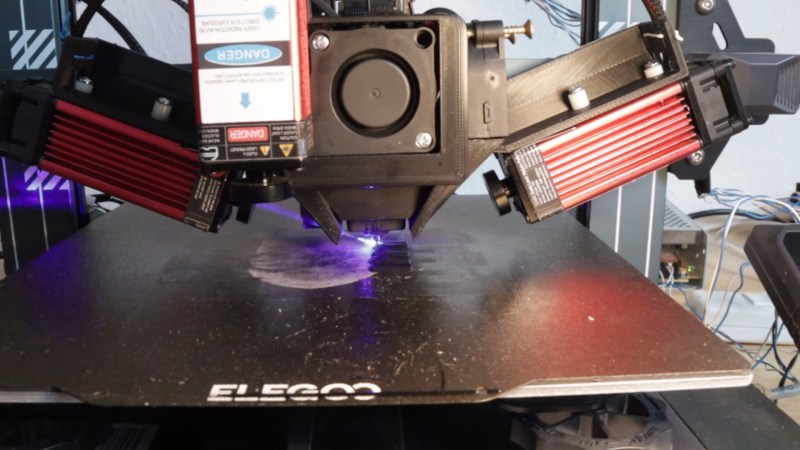
Of course, you need a laser to do this, and [I changed a thing] has two diode lasers mounted to the X-axis of his printer. Of the two, the top surfaces were a lot easier to get right than the wall smoothing, which makes sense. Top surfaces are right there for the laser to get at, after all, while with his laser setup [I changed a thing] needs to get at the walls obliquely. [I changed a thing] tries melting layer-by-layer as well as a few methods to get at the walls of a finished print; which works best seems to depend on the size of and geometry of the object, so it looks like this technique is as much art as science right now.

This effort is closely related to the previous work [I changed a thing] did on improving layer adhesion with laser melting.  It’s also not the first time we’ve seen laser-driven print smoothing, but that project used non-planar movements to do a post-print laser pass.


August 29, 2026

Fat Tire Brakes Get Wireless Upgrade

At first glance, wireless brakes seem like a recipe for disaster. For something as critical as braking, many bicyclists might prefer a physical connection to their method of safely controlling speed. But there are a number of surprising benefits of electronic or wireless braking systems. For one, they can enable systems like anti-lock braking systems and for another they can eliminate cabling or hydraulics on a bicycle. For these reasons, and just for the thrill of it, [Berm Peak] built a set of wireless brakes for his fat tire bicycle to test out the possibilities.

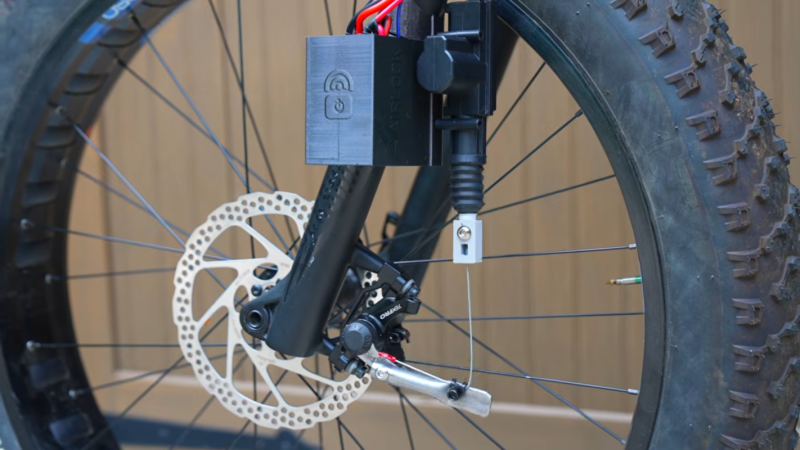
The system uses a set of ESP32 microcontrollers to handle inputs from the braking lever and outputs to the front and rear brakes, as well as a central control unit and display. The brakes themselves are controlled by actuators from car door locks, which when combined with the springs from the stock calipers work to apply a wide range of braking force to the wheels. These did take a bit of prototyping to get working right, by changing to higher quality calipers, increasing the angle of the actuator, and adding longer levers, but eventually a working braking system started to appear.

But replacing a hydraulic system with an electronic one isn’t where something like this shines. [Berm Peak] was able to add in a number of features impossible in traditional braking systems. Not only does this have an ABS system and the possibility to remotely slow down his children’s bikes when they’re riding, but there’s also a braking equalizer that allows the rider to control how much braking there is at certain positions of the brake lever, and another setting called “derp” which doesn’t engage the brakes at all until a certain threshold has passed. This might end up being the next big trend in mountain biking, unlike airless tires.