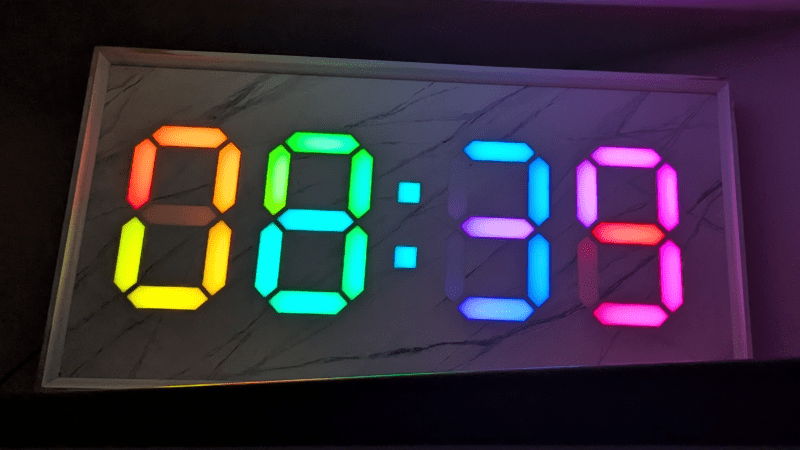
At first glance, it may look like [Rybitski]’s 7-segment RGB LED clock is something that’s been done before, but look past the beautiful mounting. It’s not just stylishly framed; the back end is just as attentively executed. It’s got a built-in web UI, MQTT automation, so Home Assistant integration is a snap, and allows remote OTA updates, so software changes don’t require taking the thing down and plugging in a cable.
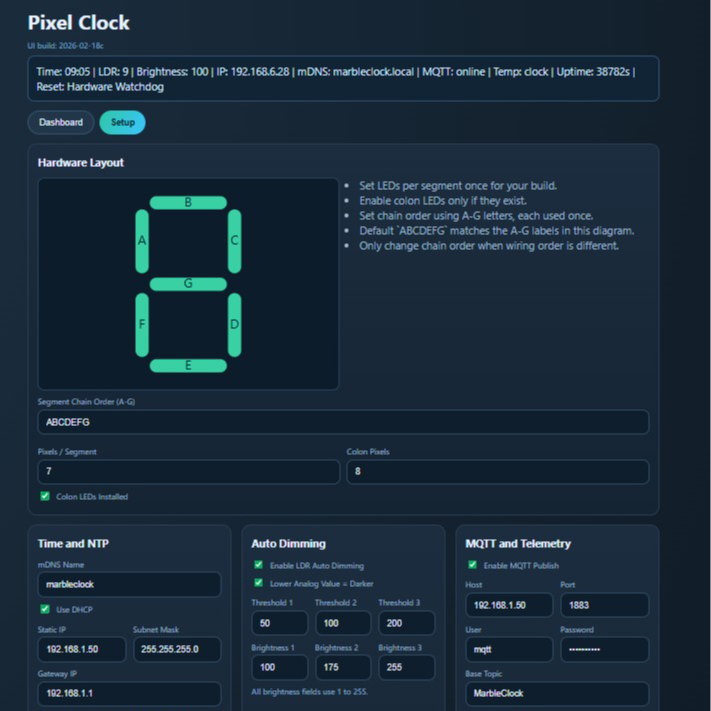
Pixel Clock is code for the Wemos D1 Mini microcontroller board and WS2812/WS2812B RGB LED strips, but it’s made to be flexible enough to support different implementations. For example, altering which LEDs in the strip belong to which segments on which digits can be configured entirely from the web interface. Naturally, one could build an LED strip clock using the same layout [Rybitski] did and require no changes at all — but it’s very nice to see that different wiring layouts are supported without needing to edit any code. There’s even automatic brightness adjustment if one adds an LDR (light-dependent resistor), which is a nice touch.
[Rybitski]’s enclosure is CNC-routed MDF, framed and given a marble finish. The number segments are capped with laser-cut frosted white acrylic, which serve as both diffuser for the LEDs and an attractive fit with the marble finish at the front. MDF is dense and opaque enough that no additional baffles or louvers are needed between segments.
With this code and an RGB LED strip, you can implement your own 7-segment clock any way you like, focusing on an artful presentation instead of re-inventing the wheel in software. Of course, there’s nothing that says one must use 7-segment numerals; some say your LED clock need not display numbers at all.


 Hello, my name is Riaz and if you want to know more about me just contact me
No comments:
Post a Comment